

Overview
The rewards system is the heart of student motivation in ClassCents. It provides tangible goals for students to work toward and creates excitement around positive behavior and academic achievement.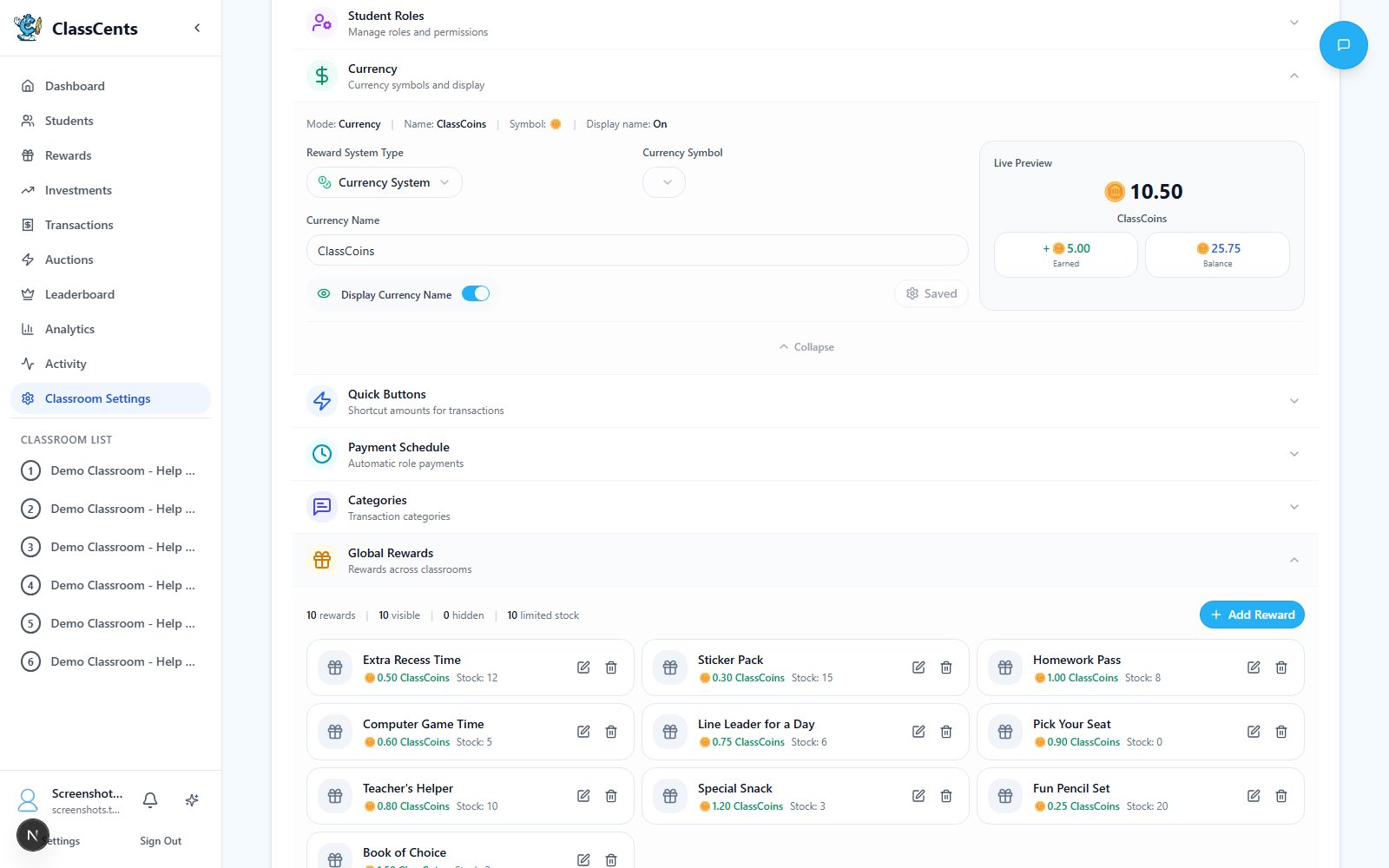
Types of Rewards
Physical Rewards
Tangible items students receive:
- School supplies (pencils, stickers, notebooks)
- Healthy snacks and treats
- Small toys (fidget toys, keychains)
- Age-appropriate books
- Art supplies
Privilege Rewards
Special classroom privileges:
- Classroom jobs (line leader, helper)
- Special seating (bean bag, teacher’s chair)
- Extra technology time
- Free time and extended recess
- Homework passes
Experience Rewards
Special activities and experiences:
- Special activities (art, music time)
- Lunch with teacher
- Show and tell opportunities
- Outdoor classroom time
- Class game selection
Recognition Rewards
Public acknowledgment and achievement:
- Achievement certificates
- Digital or physical badges
- Student of the week
- Positive parent communication
- Display on classroom honor board
Creating a Reward
Open the Reward Builder
Click the dashed Add New Reward card to open the Create New Global Reward dialog.
Fill in the Reward
- Reward Title: Clear, appealing name (e.g., “Homework Pass”, “Extra Recess”)
- Cost: Price in your classroom currency
- Stock: How many copies are available before the reward sells out
- Select Reward Icon: Pick from the icon library (categories include awards, food, school, etc.) or Upload Custom Image (optional)
- Make Reward Visible: Students can see it in the shop
- Auctionable: Can be added to auction events
- Redeemable: Students can redeem it directly with their balance
Global Rewards are shared across every classroom under your account. Edit, restock, or hide a reward once and it updates everywhere.
Pricing Strategy
Set prices strategically to encourage both spending and saving:- Low-Cost (5-25 points)
- Medium-Cost (25-100 points)
- High-Cost (100-500 points)
Purpose: Immediate gratification for quick winsExamples:
- Pencil or eraser
- Sticker or stamp
- 5 minutes free time
- Candy or small snack
Reward Availability Options
Each reward has two independent toggles that control where it appears:Redeemable (Shop)
Redeemable (Shop)
When enabled, students can purchase this reward directly from their Rewards Shop at the posted price.Best for:
- Common rewards
- Consistent availability
- Predictable pricing
- Students who save steadily
Auctionable (Auctions)
Auctionable (Auctions)
When enabled, this reward can be included in auction events where students bid competitively.Best for:
- Limited quantity items
- High-value rewards
- Creating excitement
- Teaching market economics
Managing Inventory
Set Stock Limits
Every reward has a required Stock value. Once it hits 0 the reward automatically disappears from the student shop.
Hide a Reward
Toggle Make Reward Visible off to temporarily hide a reward from students without deleting it. Useful for seasonal items or rewards you’re restocking.
Restock or Edit
Click any reward card in Global Rewards to edit its title, cost, stock, image, or availability toggles.
Best Practices
Variety is Key: Offer rewards at multiple price points so all students have achievable goals
Balance Privilege and Physical: Mix tangible items with special privileges - not all rewards need to cost you money
Student Input: Survey students about what rewards they want - they’ll work harder for rewards they actually desire
Visual Appeal: Use the icon picker or upload a custom image so each reward stands out in the shop
Clear Titles: Use specific reward titles (“15-min Free Time” beats “Free Time”) so there’s no disappointment
Regular Refresh: Rotate rewards seasonally to maintain excitement
Reward Redemption Process
Rewards can be redeemed in two ways — by students directly, or by teachers on behalf of students.- Student Self-Purchase
- Teacher Direct Redeem
Students purchase rewards from their dashboard Rewards Shop:
Confirm Purchase
A confirmation modal shows their current balance, the cost, and their new balance after purchase. Click Confirm Purchase to proceed.
Students can only purchase if they have sufficient balance and the reward is in stock. The system prevents overdrafts automatically.
Common Mistakes to Avoid
Related Topics
Currency System
Learn about earning and managing classroom currency
Auction System
Host competitive bidding for special rewards