

Understanding the Currency System
ClassCents uses a virtual currency system that mirrors real-world economics to teach students about money management, saving, and making thoughtful spending decisions.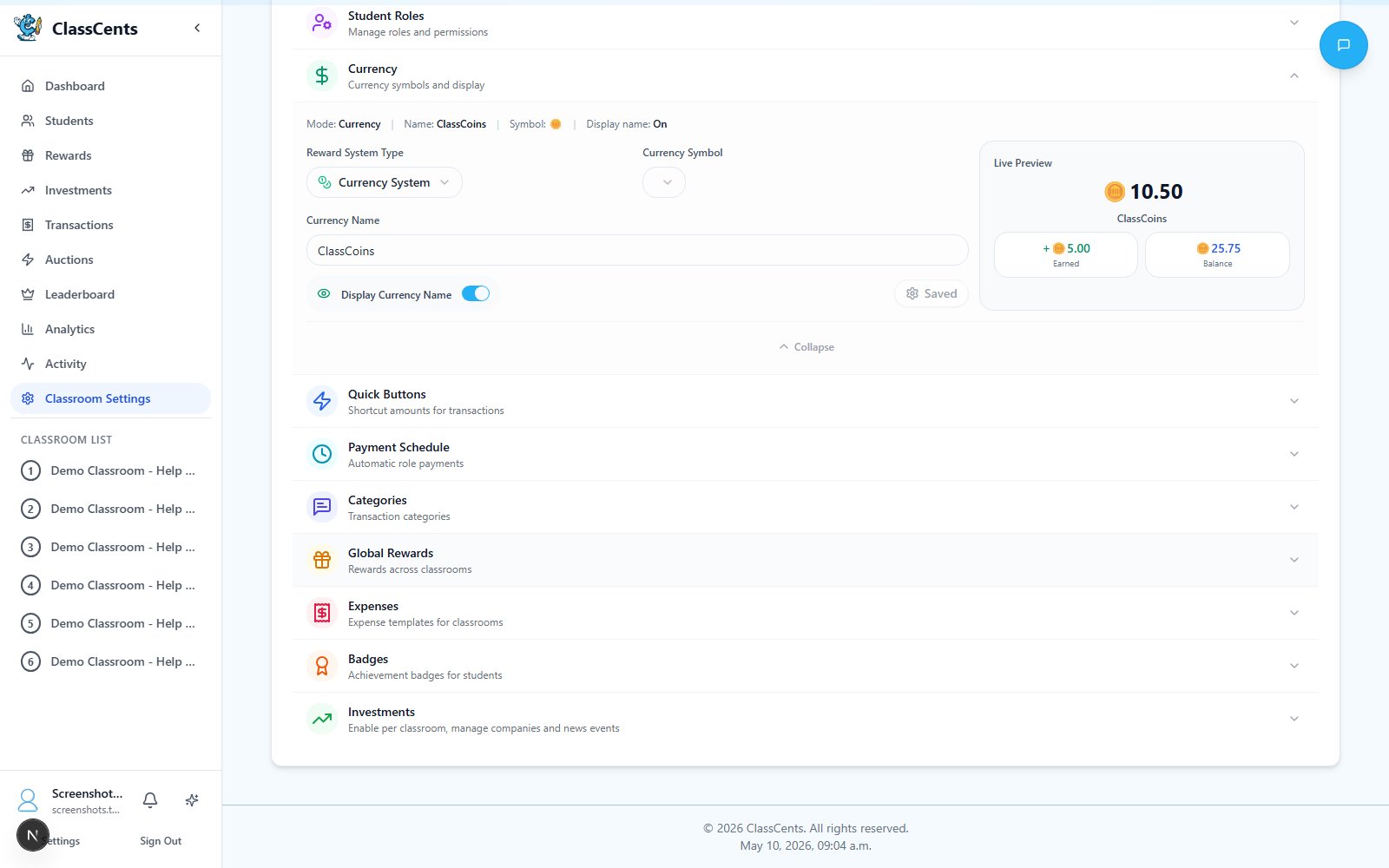
Currency Configuration
Navigate to Settings → Classroom Settings → Currency (page titled Classroom Currency) to configure:Choose between Points System or Currency System
- Points System: Simple whole numbers (e.g., 100) — great for younger students
- Currency System: Dollar-style format with decimals (e.g., $10.50) — great for teaching financial literacy
(Currency System mode only) Choose a symbol from the dropdown.Options:
$, £, €, ¥, ₹, ₱, ₩, ₦, ฿, ₫, ₴Customize your classroom currency name.Examples: “ClassCash”, “EduCoins”, “Eagle Bucks”, “Star Points”
Toggle whether the currency name is displayed alongside balances throughout the app.
Starting Balance is configured per classroom when you create or edit a classroom, not in the currency settings.
Each new student added to that classroom will automatically receive the starting balance.
This only applies when a student is first created — assigning an existing student to an additional classroom does not grant a second starting balance.
How Students Earn Currency
Academic Performance
- Homework completion
- Test scores and bonuses
- Class participation
- Project work
- Improvement rewards
Behavioral Rewards
- Following classroom rules
- Helping classmates
- Leadership and initiative
- Responsibility completion
- Positive attitude
Classroom Jobs
- Assigned paid jobs
- Automatic weekly/daily payouts
- Performance bonuses
- Special project payments
Achievement Badges
- Milestone completions
- Bonus point rewards
- Progressive tiers
- Special recognition
Best Practices
Use Consistent Amounts
Use Consistent Amounts
Standardize your point values so students understand the system:
- Small tasks: 5-10 points
- Medium achievements: 25-50 points
- Major accomplishments: 100+ points
Make Earning Criteria Clear
Make Earning Criteria Clear
Students should always know how to earn more:
- Post earning opportunities on classroom board
- Explain point values before activities
- Be transparent about why points are awarded
Award Immediately
Award Immediately
Recognition is most effective when immediate:
- Award points right after the positive behavior
- Students see their balance update in real-time
- Instant gratification reinforces the behavior
Ensure Fair Opportunities
Ensure Fair Opportunities
Every student should be able to earn:
- Don’t make all earning academic-only
- Include behavior and effort-based rewards
- Vary difficulty levels so all students can succeed
Currency Symbol Tips
Adjusting the Economy
Monitor Spending Patterns
Check your analytics to see if students are saving or spending too quickly
Adjust Earning Rates
If students run out of money too fast, increase earning opportunities or reduce reward costs
Balance Inflation
If everyone has too much money, increase reward prices or reduce earning amounts slightly
Related Topics
Rewards Setup
Create items students can purchase with their currency
Transaction Tracking
Learn how to award and deduct points effectively