> ## Documentation Index
> Fetch the complete documentation index at: https://help.classcents.com/llms.txt
> Use this file to discover all available pages before exploring further.
# Earning & Spending Currency
> How students earn points and spend them on rewards
## How Students Earn Currency
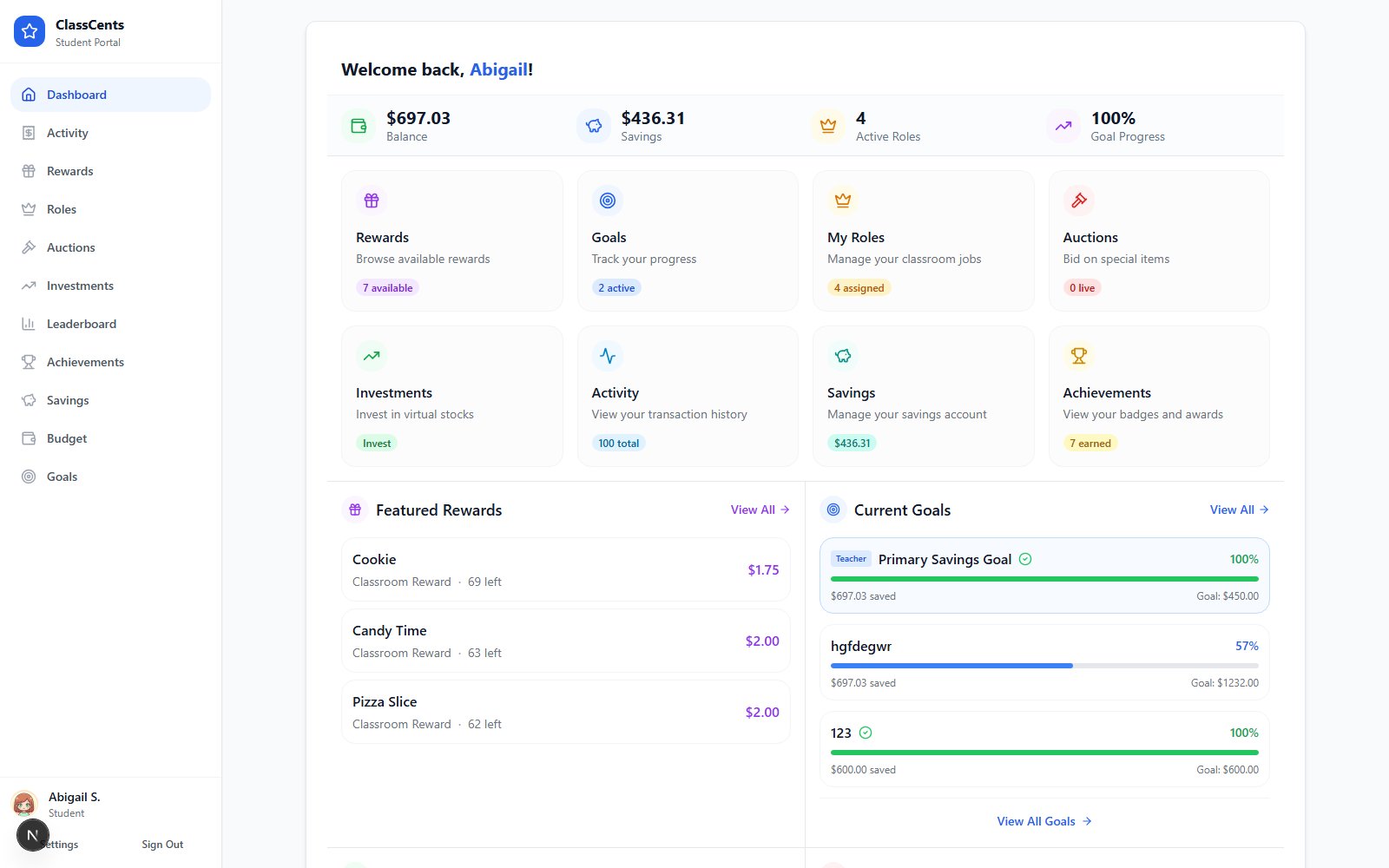 Students earn classroom currency through various activities and achievements:
**Ways to earn**:
* Complete homework assignments
* Score well on tests and quizzes
* Participate actively in class
* Finish projects on time
* Show improvement over time
**Typical amounts**: 5-50 points per activity
**Ways to earn**:
* Follow classroom rules
* Help other students
* Show good sportsmanship
* Demonstrate leadership
* Exhibit kindness and respect
**Typical amounts**: 5-25 points per behavior
**Ways to earn**:
* Assigned paid jobs
* Automatic weekly payments
* Performance bonuses
* Consistent responsibility
**Typical amounts**: 25-100 points per week
**Ways to earn**:
* Reach savings milestones
* Complete job streaks
* Lifetime earning goals
* Special achievements
**Typical amounts**: 10-50 bonus points per badge
## How Students Spend Currency
### Shopping for Rewards
Students browse the rewards shop on their dashboard
Click on reward to see full description and price
Dashboard shows if they can afford it
Click **Buy Now** - amount is deducted instantly
Teacher is notified and delivers reward when convenient
Encourage students to save up for bigger rewards instead of always buying small items - teaches delayed gratification!
### Participating in Auctions
See what's up for auction and time remaining
Students should decide their limit before bidding
Enter amount (must be higher than current high bid)
If outbid, decide whether to bid higher or walk away
At auction end, highest bidder wins and currency is deducted
Teach students not to bid their entire balance - they should save some for other opportunities!
## Budgeting Tips for Students
Help students divide their earnings:
* **50%**: Save for big goals
* **30%**: Spend on medium rewards
* **20%**: Fun small purchases
This teaches healthy financial habits!
Encourage students to:
1. Pick a reward they really want
2. Check the price
3. Calculate how long to save
4. Track progress toward goal
5. Resist impulse purchases
Dashboard has built-in goal tracking!
Students can review their transaction history to:
* See where currency goes
* Identify impulse purchases
* Find areas to save
* Celebrate earning milestones
Saving is good, but hoarding isn't fun!
Encourage students to:
* Enjoy some small rewards
* Participate in class economy
* Balance saving with spending
* Remember the goal is learning AND fun
## Earning Strategies for Students
**Do this every day**:
* Complete all homework
* Participate in class
* Help classmates
* Follow rules
Small daily earnings add up to big totals!
**Bonus opportunities**:
* Volunteer for extra tasks
* Lead group projects
* Mentor struggling peers
* Exceptional work quality
Bigger rewards for exceptional effort!
**Regular income**:
* Request classroom jobs
* Automatic weekly payments
* Build resume of responsibilities
* Steady earning source
Jobs provide reliable income!
**Achievement bonuses**:
* Work toward badge criteria
* Earn bonus points with badges
* Multiple tiers to pursue
* Long-term motivation
Badges reward sustained effort!
## Smart Spending Decisions
### When to Buy vs Save
* You've saved enough for big goal already
* Small reward would make you happy today
* End of school year approaching
* Reward might run out (limited quantity)
* Working toward specific big reward
* Auction coming up for desired item
* Not sure what you want yet
* Building up for end-of-year splurge
### Auction Bidding Strategy
Before auction:
* Decide highest amount you'll bid
* Stick to your limit
* Don't get caught up in bidding war emotions
* Don't bid immediately when auction opens
* Wait until closer to end
* See what others are willing to pay
* Bid just enough to win
* If bidding exceeds your max, stop
* Save currency for next auction
* Don't blow entire balance on one item
* Many auctions = many chances to win
* Spread bids across several auctions
* Increases chances of winning something
* More fun than all-or-nothing approach
* Teaches diversification
## Understanding Your Balance
### Balance Components
When you bid on auctions or move money to savings, your balance is split into pieces:
Currency you can spend right now on rewards or auction bids.
Amount currently held by your highest bid in an active auction. If you're outbid, this returns to your spending balance automatically.
Money you've moved into your savings account. It's protected from impulse spending and can be moved back any time.
Your **spending balance** is what you can actually use — reserved bids and savings don't count toward it.
### Transaction History
Students can view:
* Every point earned (with reason)
* Every purchase made
* Job payment dates
* Badge bonuses received
* Balance after each transaction
Review transaction history to understand your earning patterns and identify opportunities to earn more!
## Common Questions from Students
**Possible reasons**:
* You purchased a reward
* You won an auction (congratulations!)
* Teacher applied a fine for rule violation
* Spent reserved funds from losing auction bid
Check your transaction history for the exact reason!
**Check your job card** on the dashboard - it shows:
* Your assigned job
* Payment frequency (daily/weekly/monthly)
* Next payment date
Payment happens automatically at the scheduled time!
**No** - sales are final once confirmed!
This teaches:
* Think before you buy
* Make deliberate decisions
* Live with choice consequences
(Teacher can manually refund in special circumstances)
**Possible reasons**:
* Not enough currency (check price vs your balance)
* Reward is temporarily unavailable
* Reward is auction-only (can't buy, must bid)
* Quantity limit reached
**Best ways to increase earnings**:
1. Complete all homework consistently
2. Participate actively in class
3. Help classmates who are struggling
4. Apply for classroom jobs
5. Ask teacher about earning opportunities
6. Work toward achievement badges
## Teaching Moments
Help students learn valuable life skills:
**Delayed Gratification**: Saving for big rewards teaches patience and planning
**Opportunity Cost**: Spending on one thing means can't afford another - choices matter!
**Budgeting**: Planning purchases and tracking spending build financial literacy
**Risk Assessment**: Auction bidding teaches evaluating risk vs reward
**Goal Setting**: Working toward specific rewards develops goal-oriented mindset
## Related Topics
Learn about all dashboard features
Understand how the rewards shop works
Learn auction bidding strategies
Students earn classroom currency through various activities and achievements:
**Ways to earn**:
* Complete homework assignments
* Score well on tests and quizzes
* Participate actively in class
* Finish projects on time
* Show improvement over time
**Typical amounts**: 5-50 points per activity
**Ways to earn**:
* Follow classroom rules
* Help other students
* Show good sportsmanship
* Demonstrate leadership
* Exhibit kindness and respect
**Typical amounts**: 5-25 points per behavior
**Ways to earn**:
* Assigned paid jobs
* Automatic weekly payments
* Performance bonuses
* Consistent responsibility
**Typical amounts**: 25-100 points per week
**Ways to earn**:
* Reach savings milestones
* Complete job streaks
* Lifetime earning goals
* Special achievements
**Typical amounts**: 10-50 bonus points per badge
## How Students Spend Currency
### Shopping for Rewards
Students browse the rewards shop on their dashboard
Click on reward to see full description and price
Dashboard shows if they can afford it
Click **Buy Now** - amount is deducted instantly
Teacher is notified and delivers reward when convenient
Encourage students to save up for bigger rewards instead of always buying small items - teaches delayed gratification!
### Participating in Auctions
See what's up for auction and time remaining
Students should decide their limit before bidding
Enter amount (must be higher than current high bid)
If outbid, decide whether to bid higher or walk away
At auction end, highest bidder wins and currency is deducted
Teach students not to bid their entire balance - they should save some for other opportunities!
## Budgeting Tips for Students
Help students divide their earnings:
* **50%**: Save for big goals
* **30%**: Spend on medium rewards
* **20%**: Fun small purchases
This teaches healthy financial habits!
Encourage students to:
1. Pick a reward they really want
2. Check the price
3. Calculate how long to save
4. Track progress toward goal
5. Resist impulse purchases
Dashboard has built-in goal tracking!
Students can review their transaction history to:
* See where currency goes
* Identify impulse purchases
* Find areas to save
* Celebrate earning milestones
Saving is good, but hoarding isn't fun!
Encourage students to:
* Enjoy some small rewards
* Participate in class economy
* Balance saving with spending
* Remember the goal is learning AND fun
## Earning Strategies for Students
**Do this every day**:
* Complete all homework
* Participate in class
* Help classmates
* Follow rules
Small daily earnings add up to big totals!
**Bonus opportunities**:
* Volunteer for extra tasks
* Lead group projects
* Mentor struggling peers
* Exceptional work quality
Bigger rewards for exceptional effort!
**Regular income**:
* Request classroom jobs
* Automatic weekly payments
* Build resume of responsibilities
* Steady earning source
Jobs provide reliable income!
**Achievement bonuses**:
* Work toward badge criteria
* Earn bonus points with badges
* Multiple tiers to pursue
* Long-term motivation
Badges reward sustained effort!
## Smart Spending Decisions
### When to Buy vs Save
* You've saved enough for big goal already
* Small reward would make you happy today
* End of school year approaching
* Reward might run out (limited quantity)
* Working toward specific big reward
* Auction coming up for desired item
* Not sure what you want yet
* Building up for end-of-year splurge
### Auction Bidding Strategy
Before auction:
* Decide highest amount you'll bid
* Stick to your limit
* Don't get caught up in bidding war emotions
* Don't bid immediately when auction opens
* Wait until closer to end
* See what others are willing to pay
* Bid just enough to win
* If bidding exceeds your max, stop
* Save currency for next auction
* Don't blow entire balance on one item
* Many auctions = many chances to win
* Spread bids across several auctions
* Increases chances of winning something
* More fun than all-or-nothing approach
* Teaches diversification
## Understanding Your Balance
### Balance Components
When you bid on auctions or move money to savings, your balance is split into pieces:
Currency you can spend right now on rewards or auction bids.
Amount currently held by your highest bid in an active auction. If you're outbid, this returns to your spending balance automatically.
Money you've moved into your savings account. It's protected from impulse spending and can be moved back any time.
Your **spending balance** is what you can actually use — reserved bids and savings don't count toward it.
### Transaction History
Students can view:
* Every point earned (with reason)
* Every purchase made
* Job payment dates
* Badge bonuses received
* Balance after each transaction
Review transaction history to understand your earning patterns and identify opportunities to earn more!
## Common Questions from Students
**Possible reasons**:
* You purchased a reward
* You won an auction (congratulations!)
* Teacher applied a fine for rule violation
* Spent reserved funds from losing auction bid
Check your transaction history for the exact reason!
**Check your job card** on the dashboard - it shows:
* Your assigned job
* Payment frequency (daily/weekly/monthly)
* Next payment date
Payment happens automatically at the scheduled time!
**No** - sales are final once confirmed!
This teaches:
* Think before you buy
* Make deliberate decisions
* Live with choice consequences
(Teacher can manually refund in special circumstances)
**Possible reasons**:
* Not enough currency (check price vs your balance)
* Reward is temporarily unavailable
* Reward is auction-only (can't buy, must bid)
* Quantity limit reached
**Best ways to increase earnings**:
1. Complete all homework consistently
2. Participate actively in class
3. Help classmates who are struggling
4. Apply for classroom jobs
5. Ask teacher about earning opportunities
6. Work toward achievement badges
## Teaching Moments
Help students learn valuable life skills:
**Delayed Gratification**: Saving for big rewards teaches patience and planning
**Opportunity Cost**: Spending on one thing means can't afford another - choices matter!
**Budgeting**: Planning purchases and tracking spending build financial literacy
**Risk Assessment**: Auction bidding teaches evaluating risk vs reward
**Goal Setting**: Working toward specific rewards develops goal-oriented mindset
## Related Topics
Learn about all dashboard features
Understand how the rewards shop works
Learn auction bidding strategies