> ## Documentation Index
> Fetch the complete documentation index at: https://help.classcents.com/llms.txt
> Use this file to discover all available pages before exploring further.
# Classroom Jobs
> Assign paid positions and automate regular payments to students
## Overview
Assign students paid jobs to teach responsibility and provide regular earning opportunities. Jobs help students develop leadership skills while assisting with classroom management.
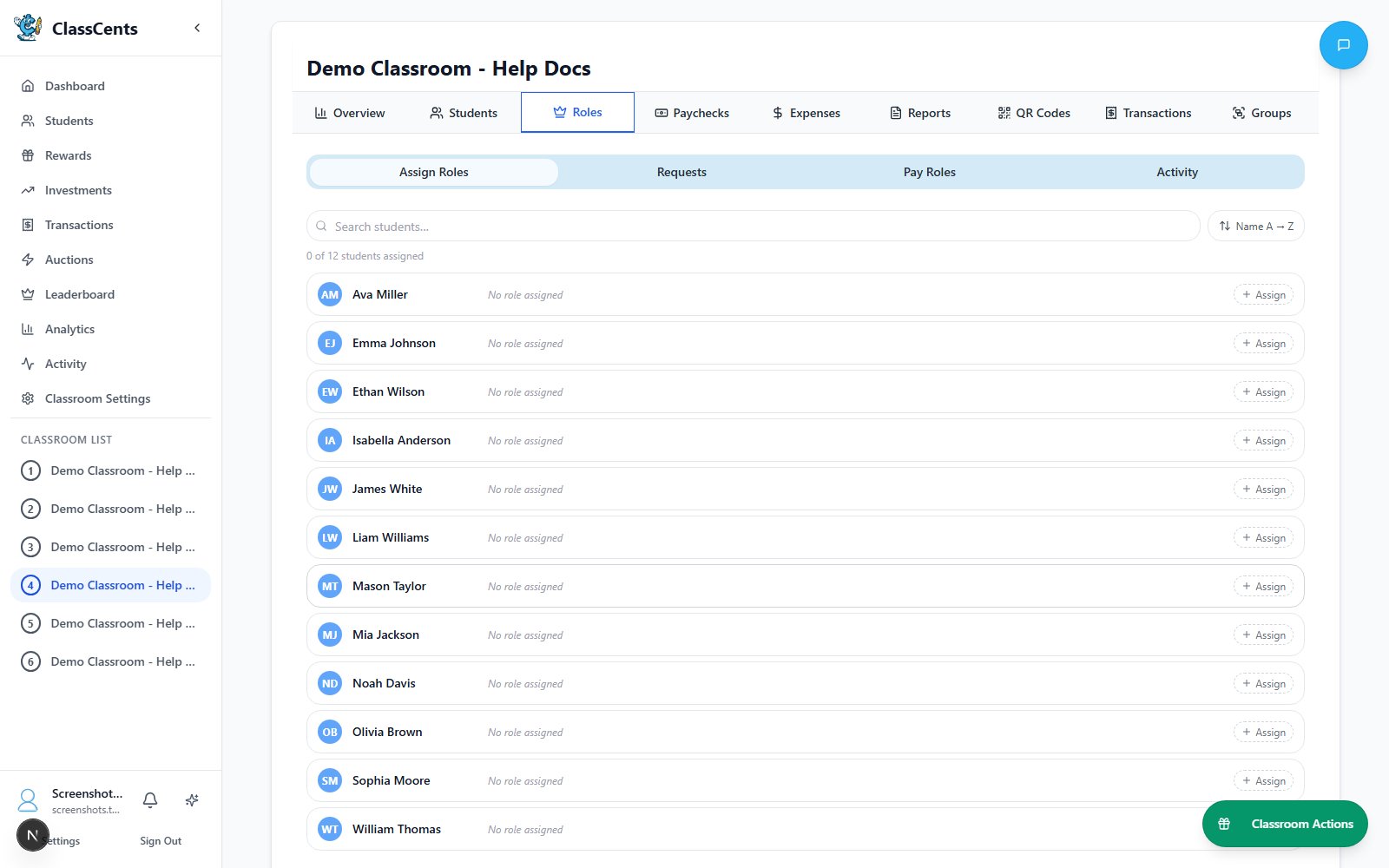 Jobs provide **automatic recurring payments** - set it up once and students earn regularly without manual transactions!
## Creating Classroom Jobs
Go to **Settings** → **Classroom Settings** → **Jobs**
Create your first classroom job
* **Job Name**: Clear job title (e.g., "Line Leader", "Board Cleaner")
* **Description**: What responsibilities are included
* **Payment Amount**: How much students earn
* **Payment Frequency**: Daily, Weekly, Bi-weekly, or Monthly
* **Max Students**: How many can have this job simultaneously
Job is now available for student assignment
## Payment Frequencies
**Payment**: Every day at configured time
**Best for**:
* Simple daily tasks (line leader, homework collector)
* Younger students who need frequent reinforcement
* High-responsibility positions
**Amount suggestion**: 5-10 points per day
**Payment**: Once per week on configured day
**Best for**:
* Most classroom jobs (most common choice)
* Balanced earning without excessive transactions
* Teaching weekly budgeting
**Amount suggestion**: 25-50 points per week
**Payment**: Every two weeks on configured day
**Best for**:
* Longer-term jobs
* Teaching budgeting over longer periods
* Matching real-world pay schedules
**Amount suggestion**: 50-100 points per two weeks
Bi-weekly frequency requires configuration in Payment Schedule settings before it can be used!
**Payment**: Once per month on configured day
**Best for**:
* Professional job simulation (older students)
* High-value positions
* Teaching long-term financial planning
**Amount suggestion**: 100-200 points per month
**Weekly** is the sweet spot for most classrooms - frequent enough to maintain motivation but not so frequent it becomes transactional noise.
## Assigning Students to Jobs
From your classroom, go to **Jobs** tab
Click on the job you want to assign
* Choose student from dropdown
* optionally set custom start date
* Click **Assign**
Student is now in the job and will receive automatic payments on the schedule
### Job Applications (Optional)
Let students apply for jobs they want:
In job settings, turn on "Allow Student Applications"
Students can apply for available jobs from their dashboard
See pending requests in **Job Management** → **Requests**
Accept applications to assign students or deny if not suitable
## Common Classroom Job Ideas
* Line Leader
* Class President
* Group Captain
* Peer Mentor
* Safety Monitor
* Homework Collector
* Assignment Distributor
* Librarian
* Technology Manager
* Supplies Organizer
* Board Cleaner
* Desk Inspector
* Plant Waterer
* Pet Caretaker
* Recycling Manager
* Calendar Helper
* Attendance Tracker
* Temperature Monitor
* Door Holder
* Materials Manager
## Job Rotation Strategy
**Most Common**: Change jobs every 1-2 weeks
* Gives all students opportunities
* Prevents boredom with same job
* Teaches adaptability
* Ensures fair distribution
**Implementation**: End all job assignments on Friday, assign new students on Monday
**For Older Students**: Keep jobs for full month
* Deeper responsibility
* Builds expertise in job
* Larger payouts justify longer commitment
* More professional feel
**Student Choice**: Let students apply for jobs they want
* Increases engagement and ownership
* Students more committed to chosen jobs
* You review applications and assign
* Fair process that students trust
**Ensure Fairness**: Track who has had which jobs
* Maintain spreadsheet or use notes
* Prioritize students who haven't had popular jobs
* Balance desirable vs less-desirable positions
* Communicate rotation plan clearly
## Automatic Payments
Payments process at your configured schedule:
Set up your classroom's payment timing in **Settings** → **Classroom Settings** → **Payment Schedule**
* Choose timezone
* Set time of day for each frequency
* Configure bi-weekly reference date if using
[Learn more about Payment Schedules →](/advanced/payment-schedules)
At the scheduled time, the system:
* Finds all students with active job assignments
* Checks if they're due for payment (based on frequency)
* Creates transaction and awards currency
* Logs payment in transaction history
Students see payment in their transaction history with reason: "Weekly/Daily/Monthly job payment for \[Job Name]"
Payments are processed automatically by the system - you don't need to do anything! Just assign the jobs and they get paid on schedule.
## Performance Bonuses
Reward exceptional job performance:
Notice students going above and beyond their job duties
Use manual transaction to award extra points with reason like "Excellent work as Line Leader this week - bonus!"
Announce the bonus to class to motivate others
Bonuses are more motivating when unexpected! Surprise stellar performers rather than promising guaranteed bonuses.
## Job Management
### Editing Jobs
* Update payment amounts as your economy evolves
* Change frequency if needed
* Adjust max students allowed
* Update descriptions
### Removing Students from Jobs
Navigate to **Jobs** → View active assignments
Find the student you want to remove
Click **Remove** or **End Job** - they won't receive future payments
Ending a job assignment doesn't affect past payments - those remain in the student's balance and transaction history.
## Best Practices
**Start with 5-10 job types** - enough variety without being overwhelming
**Pay fairly** - similar effort = similar pay to maintain perceived fairness
**Rotate regularly** - all students get opportunities for popular jobs
**Celebrate great work** - publicly recognize students who excel in their jobs
**Tie to real life** - connect to real-world jobs and responsibility
**Track job history** - ensure equitable distribution over time
## Troubleshooting
**Check**:
1. Payment Schedule is configured (**Settings** → **Classroom Settings** → **Payment Schedule**)
2. Students are actively assigned to jobs
3. Current time matches scheduled payment time
4. Bi-weekly frequency requires reference date setup
**Check**:
1. Student is assigned to an active job
2. Assignment start date is in the past
3. Job frequency matches classroom schedule
4. Student hasn't been removed from job
**If this happens**:
1. Check transaction history for actual duplicates
2. Manual undo if necessary
3. Report to support - may indicate timing issue
## Related Topics
Configure when automated payments occur (NEW!)
View all job payment transactions
Jobs provide **automatic recurring payments** - set it up once and students earn regularly without manual transactions!
## Creating Classroom Jobs
Go to **Settings** → **Classroom Settings** → **Jobs**
Create your first classroom job
* **Job Name**: Clear job title (e.g., "Line Leader", "Board Cleaner")
* **Description**: What responsibilities are included
* **Payment Amount**: How much students earn
* **Payment Frequency**: Daily, Weekly, Bi-weekly, or Monthly
* **Max Students**: How many can have this job simultaneously
Job is now available for student assignment
## Payment Frequencies
**Payment**: Every day at configured time
**Best for**:
* Simple daily tasks (line leader, homework collector)
* Younger students who need frequent reinforcement
* High-responsibility positions
**Amount suggestion**: 5-10 points per day
**Payment**: Once per week on configured day
**Best for**:
* Most classroom jobs (most common choice)
* Balanced earning without excessive transactions
* Teaching weekly budgeting
**Amount suggestion**: 25-50 points per week
**Payment**: Every two weeks on configured day
**Best for**:
* Longer-term jobs
* Teaching budgeting over longer periods
* Matching real-world pay schedules
**Amount suggestion**: 50-100 points per two weeks
Bi-weekly frequency requires configuration in Payment Schedule settings before it can be used!
**Payment**: Once per month on configured day
**Best for**:
* Professional job simulation (older students)
* High-value positions
* Teaching long-term financial planning
**Amount suggestion**: 100-200 points per month
**Weekly** is the sweet spot for most classrooms - frequent enough to maintain motivation but not so frequent it becomes transactional noise.
## Assigning Students to Jobs
From your classroom, go to **Jobs** tab
Click on the job you want to assign
* Choose student from dropdown
* optionally set custom start date
* Click **Assign**
Student is now in the job and will receive automatic payments on the schedule
### Job Applications (Optional)
Let students apply for jobs they want:
In job settings, turn on "Allow Student Applications"
Students can apply for available jobs from their dashboard
See pending requests in **Job Management** → **Requests**
Accept applications to assign students or deny if not suitable
## Common Classroom Job Ideas
* Line Leader
* Class President
* Group Captain
* Peer Mentor
* Safety Monitor
* Homework Collector
* Assignment Distributor
* Librarian
* Technology Manager
* Supplies Organizer
* Board Cleaner
* Desk Inspector
* Plant Waterer
* Pet Caretaker
* Recycling Manager
* Calendar Helper
* Attendance Tracker
* Temperature Monitor
* Door Holder
* Materials Manager
## Job Rotation Strategy
**Most Common**: Change jobs every 1-2 weeks
* Gives all students opportunities
* Prevents boredom with same job
* Teaches adaptability
* Ensures fair distribution
**Implementation**: End all job assignments on Friday, assign new students on Monday
**For Older Students**: Keep jobs for full month
* Deeper responsibility
* Builds expertise in job
* Larger payouts justify longer commitment
* More professional feel
**Student Choice**: Let students apply for jobs they want
* Increases engagement and ownership
* Students more committed to chosen jobs
* You review applications and assign
* Fair process that students trust
**Ensure Fairness**: Track who has had which jobs
* Maintain spreadsheet or use notes
* Prioritize students who haven't had popular jobs
* Balance desirable vs less-desirable positions
* Communicate rotation plan clearly
## Automatic Payments
Payments process at your configured schedule:
Set up your classroom's payment timing in **Settings** → **Classroom Settings** → **Payment Schedule**
* Choose timezone
* Set time of day for each frequency
* Configure bi-weekly reference date if using
[Learn more about Payment Schedules →](/advanced/payment-schedules)
At the scheduled time, the system:
* Finds all students with active job assignments
* Checks if they're due for payment (based on frequency)
* Creates transaction and awards currency
* Logs payment in transaction history
Students see payment in their transaction history with reason: "Weekly/Daily/Monthly job payment for \[Job Name]"
Payments are processed automatically by the system - you don't need to do anything! Just assign the jobs and they get paid on schedule.
## Performance Bonuses
Reward exceptional job performance:
Notice students going above and beyond their job duties
Use manual transaction to award extra points with reason like "Excellent work as Line Leader this week - bonus!"
Announce the bonus to class to motivate others
Bonuses are more motivating when unexpected! Surprise stellar performers rather than promising guaranteed bonuses.
## Job Management
### Editing Jobs
* Update payment amounts as your economy evolves
* Change frequency if needed
* Adjust max students allowed
* Update descriptions
### Removing Students from Jobs
Navigate to **Jobs** → View active assignments
Find the student you want to remove
Click **Remove** or **End Job** - they won't receive future payments
Ending a job assignment doesn't affect past payments - those remain in the student's balance and transaction history.
## Best Practices
**Start with 5-10 job types** - enough variety without being overwhelming
**Pay fairly** - similar effort = similar pay to maintain perceived fairness
**Rotate regularly** - all students get opportunities for popular jobs
**Celebrate great work** - publicly recognize students who excel in their jobs
**Tie to real life** - connect to real-world jobs and responsibility
**Track job history** - ensure equitable distribution over time
## Troubleshooting
**Check**:
1. Payment Schedule is configured (**Settings** → **Classroom Settings** → **Payment Schedule**)
2. Students are actively assigned to jobs
3. Current time matches scheduled payment time
4. Bi-weekly frequency requires reference date setup
**Check**:
1. Student is assigned to an active job
2. Assignment start date is in the past
3. Job frequency matches classroom schedule
4. Student hasn't been removed from job
**If this happens**:
1. Check transaction history for actual duplicates
2. Manual undo if necessary
3. Report to support - may indicate timing issue
## Related Topics
Configure when automated payments occur (NEW!)
View all job payment transactions