> ## Documentation Index
> Fetch the complete documentation index at: https://help.classcents.com/llms.txt
> Use this file to discover all available pages before exploring further.
# Analytics & Reports
> Track student engagement and measure classroom economy effectiveness
## Overview
Track student progress, identify trends, and measure the effectiveness of your classroom economy with comprehensive analytics and reporting tools.
 ## Accessing Analytics
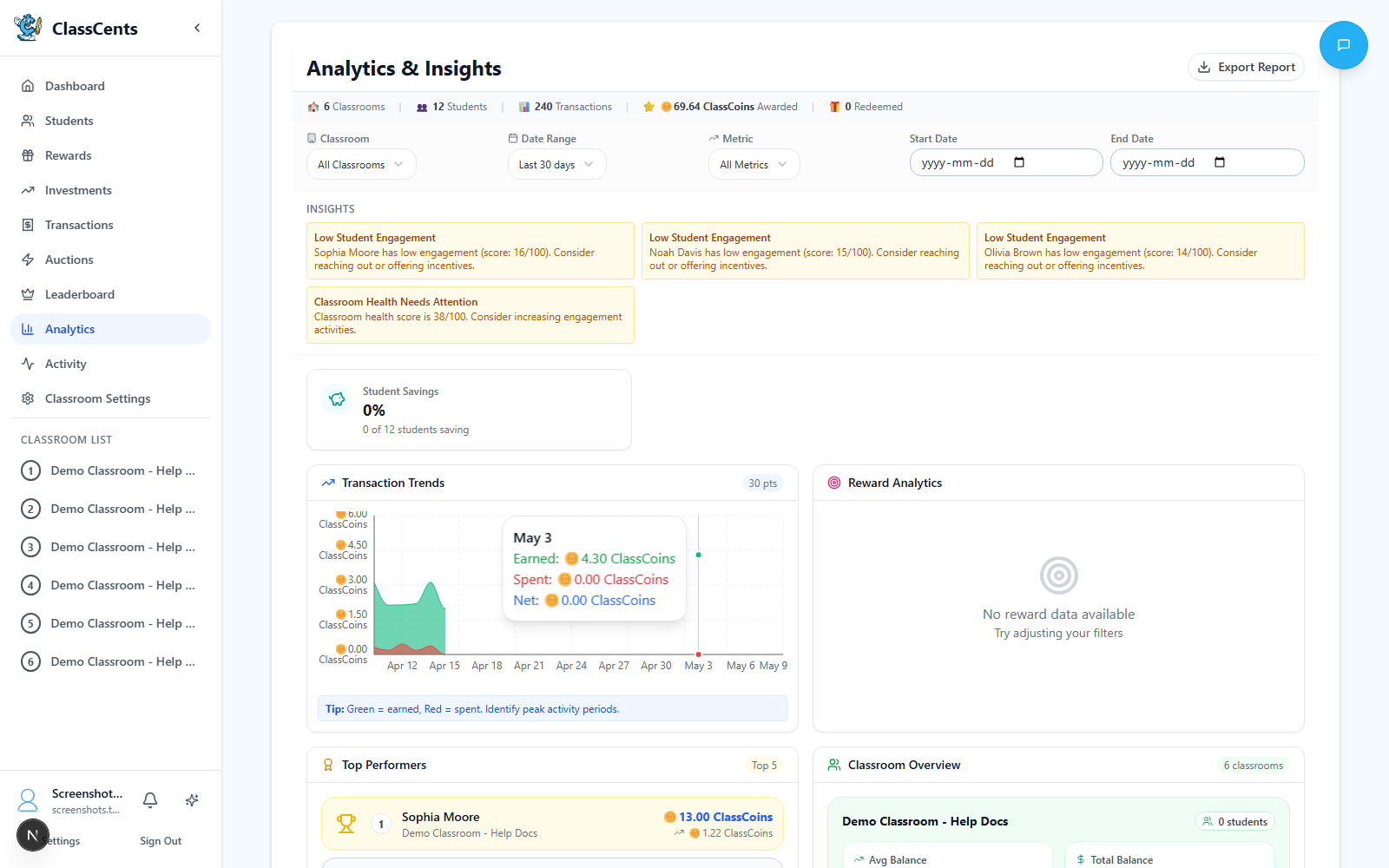
Click **Analytics** in your teacher sidebar.
Use the classroom selector at the top to focus on one classroom or view **All Classrooms** combined.
Choose a preset range or set custom **Start Date** / **End Date** values.
The page surfaces auto-generated insight cards (warnings, successes, info) and a series of charts: transaction trends, top earners, reward redemptions, job performance, student engagement, balance distribution, and badge stats.
Click **Export** in the top-right to download your filtered analytics as CSV or a printable HTML report.
## Key Metrics to Track
### Student-Level Metrics
**What it shows**: How much currency each student currently has
**What to look for**:
* Students with zero balance may be disengaged
* Very high balances may indicate fear of spending
* Negative balances need immediate attention
**What it shows**: Lifetime earnings for each student
**What to look for**:
* Low earners may need more opportunities
* High earners are engaged - celebrate them!
* Compare to class average
**What it shows**: Points per day/week average
**What to look for**:
* Declining trends may indicate loss of interest
* Spikes show what motivates students
* Consistency indicates healthy engagement
**What it shows**: Saver vs spender classification
**What to look for**:
* Pure savers may need encouragement to enjoy rewards
* Impulsive spenders may need budgeting lessons
* Balanced students have healthy financial behavior
### Classroom-Level Metrics
**What it shows**: Sum of all student balances
**Why it matters**:
* Too high = inflation risk, adjust earning rates down
* Too low = students feel poor, increase opportunities
* Steady growth = healthy economy
**What it shows**: Number of transactions per day/week
**Why it matters**:
* High volume = active engagement
* Declining volume = loss of interest
* Spikes show what activities work best
**What it shows**: Which rewards are redeemed most
**Why it matters**:
* Popular rewards work - get more similar items
* Unpopular rewards can be removed or repriced
* Informs future reward decisions
**What it shows**: Mean balance across all students
**Why it matters**:
* Rising average = students saving (good!)
* Falling average = spending > earning (adjust)
* Compare individual students to average
## Using Analytics Effectively
Use analytics to find students who need intervention:
**Low Balance + Low Earning**:
* Not engaged with system
* May need different motivation
* Consider one-on-one conversation
* Create earn opportunities they can succeed at
**High Earning but Zero Balance**:
* Spending impulsively
* May need budgeting lesson
* Help set savings goals
Use demand data to optimize prices:
**Reward never purchased**: Price too high or undesirable
**Reward always sold out**: Price too low or very popular
**Some students priced out**: Need more low-cost options
**Everyone hoarding**: Make spending more appealing
Share positive trends:
* "Class earned 5,000 points this week!"
* "Everyone completed homework 10 days straight!"
* "Record number of students reached savings goals!"
Public recognition reinforces positive behavior
Learn from the data:
* Which behaviors earn students the most? Do more of that!
* What times are most active? Schedule important activities then
* Are certain students never earning? Why? How can you help?
* Is the economy too inflated or too restrictive? Adjust!
## Timezone for Analytics
Your **user profile timezone** (set in User Settings) controls how dates and times are displayed in analytics. This is separate from payment timezone!
* **Profile Timezone**: For viewing analytics data
* **Payment Timezone**: For when automated payments occur
[Learn more →](/support/faq#timezone-settings)
## Export Options
Click **Export** in the analytics title bar to download your filtered data:
* **CSV** — raw rows for spreadsheets (top earners, student engagement, reward redemptions, job performance, etc.)
* **HTML Report** — a print-ready summary you can save as PDF or share with admins
All exports respect the current classroom and date range filters.
## Privacy Considerations
Analytics data stays within your account - not shared with other teachers or ClassCents staff
Students only see their own data, never classmates' balances or activity
Parent reports can be generated per student for communication
Anonymized data may be used for system improvements (opt-in only)
## Related Topics
Understand transaction tracking
View individual student analytics
## Accessing Analytics
Click **Analytics** in your teacher sidebar.
Use the classroom selector at the top to focus on one classroom or view **All Classrooms** combined.
Choose a preset range or set custom **Start Date** / **End Date** values.
The page surfaces auto-generated insight cards (warnings, successes, info) and a series of charts: transaction trends, top earners, reward redemptions, job performance, student engagement, balance distribution, and badge stats.
Click **Export** in the top-right to download your filtered analytics as CSV or a printable HTML report.
## Key Metrics to Track
### Student-Level Metrics
**What it shows**: How much currency each student currently has
**What to look for**:
* Students with zero balance may be disengaged
* Very high balances may indicate fear of spending
* Negative balances need immediate attention
**What it shows**: Lifetime earnings for each student
**What to look for**:
* Low earners may need more opportunities
* High earners are engaged - celebrate them!
* Compare to class average
**What it shows**: Points per day/week average
**What to look for**:
* Declining trends may indicate loss of interest
* Spikes show what motivates students
* Consistency indicates healthy engagement
**What it shows**: Saver vs spender classification
**What to look for**:
* Pure savers may need encouragement to enjoy rewards
* Impulsive spenders may need budgeting lessons
* Balanced students have healthy financial behavior
### Classroom-Level Metrics
**What it shows**: Sum of all student balances
**Why it matters**:
* Too high = inflation risk, adjust earning rates down
* Too low = students feel poor, increase opportunities
* Steady growth = healthy economy
**What it shows**: Number of transactions per day/week
**Why it matters**:
* High volume = active engagement
* Declining volume = loss of interest
* Spikes show what activities work best
**What it shows**: Which rewards are redeemed most
**Why it matters**:
* Popular rewards work - get more similar items
* Unpopular rewards can be removed or repriced
* Informs future reward decisions
**What it shows**: Mean balance across all students
**Why it matters**:
* Rising average = students saving (good!)
* Falling average = spending > earning (adjust)
* Compare individual students to average
## Using Analytics Effectively
Use analytics to find students who need intervention:
**Low Balance + Low Earning**:
* Not engaged with system
* May need different motivation
* Consider one-on-one conversation
* Create earn opportunities they can succeed at
**High Earning but Zero Balance**:
* Spending impulsively
* May need budgeting lesson
* Help set savings goals
Use demand data to optimize prices:
**Reward never purchased**: Price too high or undesirable
**Reward always sold out**: Price too low or very popular
**Some students priced out**: Need more low-cost options
**Everyone hoarding**: Make spending more appealing
Share positive trends:
* "Class earned 5,000 points this week!"
* "Everyone completed homework 10 days straight!"
* "Record number of students reached savings goals!"
Public recognition reinforces positive behavior
Learn from the data:
* Which behaviors earn students the most? Do more of that!
* What times are most active? Schedule important activities then
* Are certain students never earning? Why? How can you help?
* Is the economy too inflated or too restrictive? Adjust!
## Timezone for Analytics
Your **user profile timezone** (set in User Settings) controls how dates and times are displayed in analytics. This is separate from payment timezone!
* **Profile Timezone**: For viewing analytics data
* **Payment Timezone**: For when automated payments occur
[Learn more →](/support/faq#timezone-settings)
## Export Options
Click **Export** in the analytics title bar to download your filtered data:
* **CSV** — raw rows for spreadsheets (top earners, student engagement, reward redemptions, job performance, etc.)
* **HTML Report** — a print-ready summary you can save as PDF or share with admins
All exports respect the current classroom and date range filters.
## Privacy Considerations
Analytics data stays within your account - not shared with other teachers or ClassCents staff
Students only see their own data, never classmates' balances or activity
Parent reports can be generated per student for communication
Anonymized data may be used for system improvements (opt-in only)
## Related Topics
Understand transaction tracking
View individual student analytics